> For the complete documentation index, see [llms.txt](https://docs.convogrid.ai/convogrid/llms.txt). Markdown versions of documentation pages are available by appending `.md` to page URLs; this page is available as [Markdown](https://docs.convogrid.ai/convogrid/integration/convo-connector.md).
# Convo Connector
This guide outlines the steps to integrate your Convo Bot with your platform, enabling seamless interaction with your users.
### 1. Verify your Domain
Before integrating your bot into your platform, domain ownership verification is required. To verify your domain, email to `support@convogrid.ai` with the subject `Convo Connector` and including details on the bot name and the domain name.
Once we receive an integration request, one of our support engineers will get in touch to guide you through the next steps.
### 2. Integrate the Connector
Once your domain is verified, the final step is to integrate the bot into the platform. To do so add the provided script tag to your website’s HTML.
```javascript
```
And that's it. Your platform is now supercharged with ConvoGrid!
## Sample view a integrated ConvoGrid Bot
{% embed url="" %}
## Bot Placement
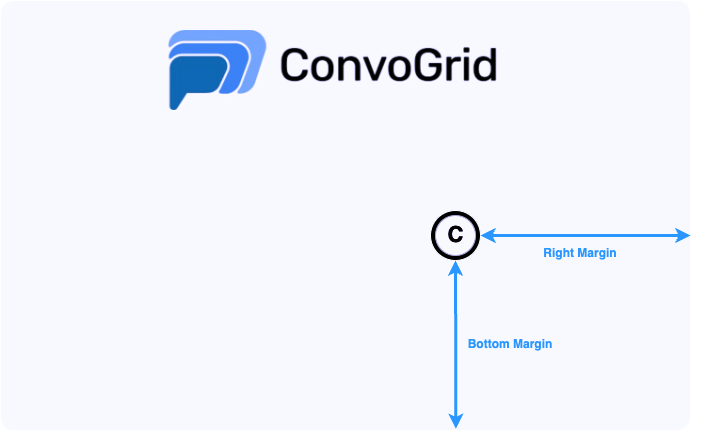
The default bot placement is `3vw` from the `right-margin` and the `3vh` from the `bottom-margin` of your web application.
Convo Bot Placement
### Override Default Bot Placement
The default bot placement can be customized by passing the `right-margin` and `bottom-margin` attributes in the script tag.
### Dynamic Bot Relocation
The bot's location can be modified using the `convoExtensionPosition` API.
```javascript
// 5vh up and 5vw left from the bottom right corner of the document
window.convoExtensionPosition({rightMargin:'5vw',bottomMargin: '5vh'})
// 5vh up and 3vw (or right-margin value if persented) left from the bottom right corner of the document
window.convoExtensionPosition({bottomMargin: '5vh'})
// 5vw left and 3vh (or bottom-margin value if persented) up from the bottom right corner of the document
window.convoExtensionPosition({rightMargin: '5vw'})
```
## Fallback to ConvoGrid Default Bot
In case of a failure in your Convo Bot, we support a fallback option to enable the default ConvoGrid Bot. This allows users to interact with Convo bot widget uninterrupted, until your bot is restored and operational. To enable this feature, add the script attribute `fallback-to-default="true"` to your application. By default, this feature is disabled.
## FAQ
### 1. Can anyone integrate my bot in their platforms?
Your bot is unique to your verified domain. It's not possible for someone else to use your bot in their platform.
### 2. Can I customize the look and feel?
Customization options are available via the [Edit Bots](/convogrid/my-bots/edit-bots.md). If further customization is needed, feel free to contact us at `support@convogrid.ai`.